Introducing expo-pdf-text-extract: Native PDF Text Extraction for React Native & Expo
A free, open-source Expo module that extracts text from PDFs using native APIs. Works with Expo SDK 49+, full TypeScript support, processes documents in milliseconds.
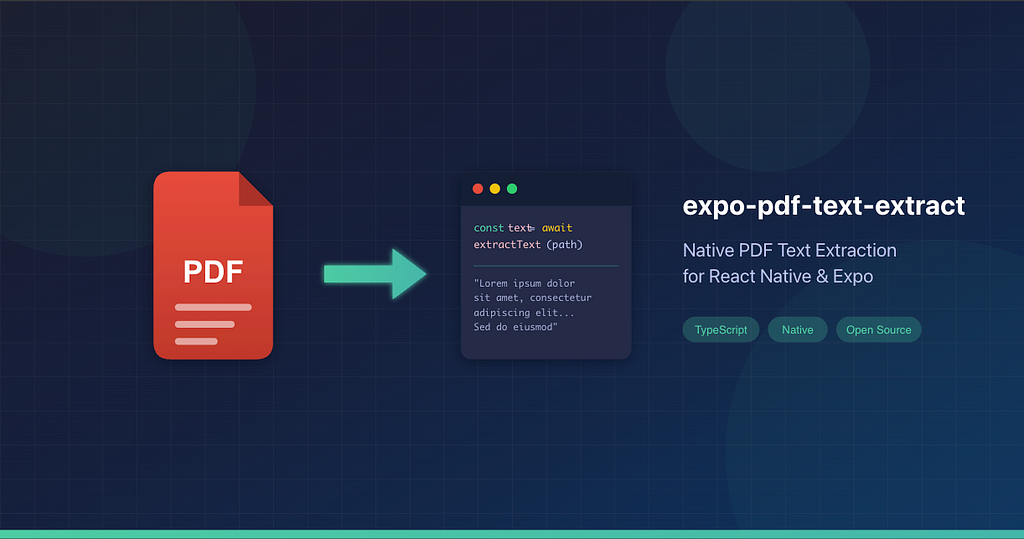
TL;DR: A free, open-source Expo module that extracts text from PDFs using native APIs (iOS PDFKit + Android PDFBox). Works with Expo SDK 49+, full TypeScript support, processes documents in milliseconds. Install with npx expo install expo-pdf-text-extract → npm | GitHub
If you’ve ever tried to extract text from a PDF in a React Native or Expo app, you know the frustration. You search npm, find a dozen packages that view PDFs, a few that convert them to images, and maybe one or two that claim to extract text but haven’t been updated since 2019.
I ran into this exact problem while building a React Native app that needed to parse PDF documents. After wasting hours evaluating options, I decided to build the solution I wished existed.
Meet expo-pdf-text-extract — a native Expo module that does exactly what the name says: extracts text from PDF files. Fast, simple, and open-source.
The Problem: PDF Text Extraction Shouldn’t Be This Hard
Here’s what the landscape looked like when I started:
PDF Viewer Libraries — Great for displaying PDFs, useless for getting the text out. WebView-based solutions can’t expose the underlying content to your JavaScript code.
JavaScript-Only Solutions — Libraries like pdf.js work, but they're slow. Parsing a multi-page document in JS means blocking your thread and watching your app stutter.
Commercial SDKs — PSPDFKit, PDFTron, and others offer excellent functionality. They also cost hundreds or thousands per month. Overkill when you just need the text.
OCR Libraries — If you’re extracting text from scanned documents (images), OCR makes sense. But most PDFs are digital — the text is already embedded. Running OCR on them is like taking a photo of your screen to copy text instead of pressing Ctrl+C.
What I needed was simple: call a function, pass a file path, get the text back. No subscriptions, no complexity, no performance penalties.
How expo-pdf-text-extract Works
Digital PDFs store text as structured data. When you open a PDF in any reader, it’s not rendering an image — it’s laying out actual text characters at specific coordinates. Both iOS and Android have built-in APIs to access this text layer.
expo-pdf-text-extract leverages these platform-native APIs:
- iOS: Apple’s PDFKit framework (built into iOS, no external dependencies)
- Android: Apache PDFBox library (the industry-standard open-source PDF library)
The native code extracts text directly from the PDF’s internal structure. No image processing, no machine learning, no network calls. A 10-page document typically processes in under 100 milliseconds.
This approach gives you 100% accuracy for digital PDFs because you’re reading the exact characters the document contains — not guessing what they might be.
Getting Started
Installation
npx expo install expo-pdf-text-extract
Note: This package requires Expo SDK 49+ and a development build. It won’t work in Expo Go because it includes native code.
If you haven’t created a development build before:
npx expo prebuild
npx expo run:ios  # or run:android
Basic Usage
import { extractText, getPageCount, isAvailable } from 'expo-pdf-text-extract';
// Always check availability first
if (!isAvailable()) {
  console.log('PDF extraction not available on this platform');
  return;
}
// Extract all text from a PDF
const handlePdfExtraction = async (filePath: string) => {
  try {
    const text = await extractText(filePath);
    console.log('Extracted text:', text);

    const pages = await getPageCount(filePath);
    console.log(\`Document has ${pages} pages\`);
  } catch (error) {
    console.error('Extraction failed:', error);
  }
};
Extract Specific Pages
Need text from just the first page or a specific range? No problem:
import { extractTextFromPages } from 'expo-pdf-text-extract';
// Extract only pages 1-3 (1-indexed)
const partialText = await extractTextFromPages(filePath, 1, 3);
Supported Path Formats
The package handles whatever path format you throw at it:
// Absolute paths
await extractText('/var/mobile/.../document.pdf');
// file:// URIs (common from document pickers)
await extractText('file:///path/to/document.pdf');
// content:// URIs (Android content providers)
await extractText('content://com.android.providers/.../document.pdf');
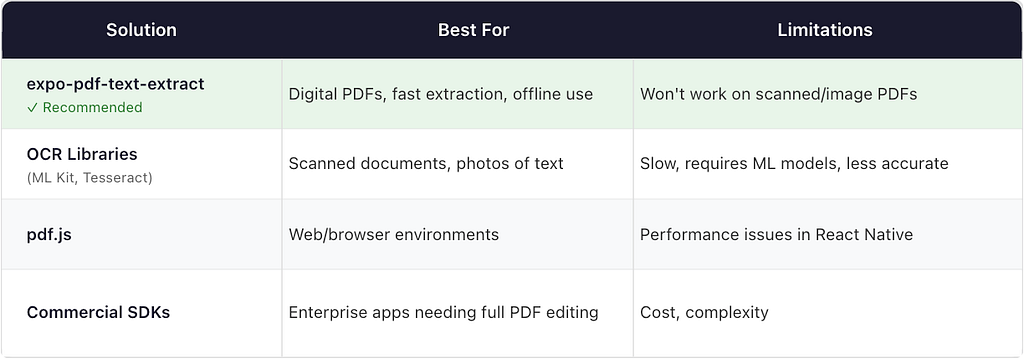
Use expo-pdf-text-extract when:
- Your PDFs are digitally created (invoices, policies, reports, receipts from most services)
- You need fast, offline extraction
- You want a simple, lightweight solution
Look elsewhere when:
- Your PDFs are scanned images (you’ll need OCR)
- You need to edit or annotate PDFs (consider a full-featured SDK)
- You’re building for web only (pdf.js works well there)
What You Can Build With It
This package opens up a lot of possibilities for React Native apps:
- Expense tracking — Extract data from invoices and receipts
- Document management — Index and search PDF content locally
- Form processing — Pull structured data from standardized PDF forms
- Policy readers — Parse insurance or legal documents for key information
- Receipt scanners — Read digital receipts from email attachments
I built this to solve my own problem — extracting and categorizing data from PDFs within my app. What used to be manual data entry now happens in milliseconds.
Try It Out
The package is fully open-source under the MIT license. You can:
- Install from npm: npx expo install expo-pdf-text-extract
- View the source: github.com/gr8pathik/expo-pdf-text-extract
- Read the docs: npmjs.com/package/expo-pdf-text-extract
If this solves a problem for you, I’d appreciate a ⭐ on GitHub. Found a bug or have a feature request? Open an issue — I’m actively maintaining this and genuinely want to hear what would make it more useful.
Sometimes the best tools are the simplest ones. Happy extracting!
Pathik Gandhi is a technology consultant and React Native developer. He builds things that solve problems he actually has, then shares them with the community. Find him on GitHub.
Also published on Medium